Easy Fax - Send Fax from Phone
Cool Mobile SolutionBusiness
4.38.63K Reviews
- Version
- 2.4.9
- Installs
- 1.00M
- Age Rating
- Everyone
Screenshots
Our Review of Easy Fax - Send Fax from Phone
 Analysis by Appyee
I reach for faxing apps only when a form, office, or recipient insists on fax rather than email. That usually means I’m starting with a paper document, a photo in my camera roll, or a file already on my phone—and I want to get it sent without finding a physical fax machine. Easy Fax - Send Fax from Phone is built for that narrow but still useful job. In my experience, the main appeal is not that faxing becomes exciting; it’s that an awkward errand can fit into a few steps on a phone.
When a phone-based fax makes sense
This is a business app from Cool Mobile Solution, and its focus is practical: prepare a document on your phone and send it to a fax number. It suits occasional situations such as returning a signed form, sending a receipt, or forwarding paperwork while away from a printer. I would also consider it for a small business owner who handles infrequent fax requests and doesn’t want to maintain a dedicated machine.
It is less compelling if nearly everyone you deal with accepts email or online forms. A PDF attached to an email is usually easier for both sides, and it avoids the extra step of entering a fax destination. Likewise, if you send large batches of faxes routinely, I’d compare the ongoing cost and workflow with a dedicated business fax service before relying on a phone app.
A realistic trip from paper to recipient
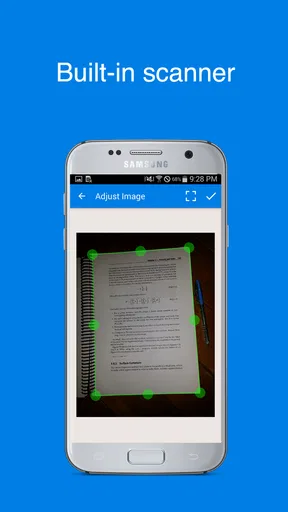
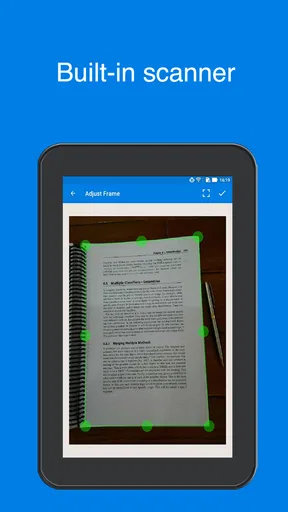
Imagine I’m out of the office and need to send a signed page to an organization that only accepts fax. I can capture the page in the app rather than hunt for a scanner, then use the image adjustments to make the writing and printed text easier to read. Cropping matters more than it first seems: trimming away a table edge or a dark background can make the actual page clearer and help avoid sending a messy-looking image.
Before sending, I’d check that the entire page is in frame, that small text remains readable, and that no other papers or personal details appear around the edges. A phone camera can introduce shadows, perspective distortion, or glare, especially under indoor lighting. Taking a moment to place the page on a contrasting flat surface and hold the phone parallel to it is a simple way to improve the result before the fax leaves the device.
Then I’d choose the prepared document, enter the recipient’s fax number carefully, and send it. The app says it can reach recipients in over 100 countries, which can help when a business contact is abroad. Afterward, I’d keep an eye out for the delivery confirmation and save or retain the original document until I know the recipient has what they need. A confirmation is useful, but it does not replace checking that I selected the right file and number.
Getting Started with Easy Fax
First things first, downloading Easy Fax is as simple as finding it on the App Store or Google Play. Once installed, the interface is clean and intuitive, which is always a bonus. You don’t need a degree in rocket science to navigate this app. Just a few taps and you’re ready to send your first fax.
Setting up is straightforward. You’ll need to register, but it’s quick and painless. The app offers a free trial, which is a sweet way to test the waters before committing. It’s always nice when apps offer a try-before-you-buy option, right?
Features That Stand Out
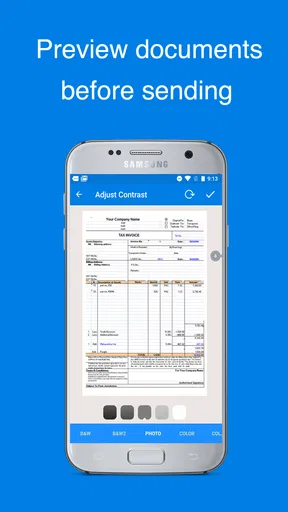
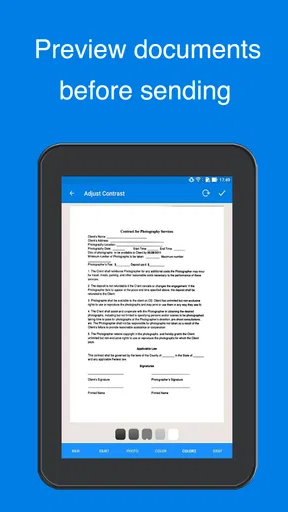
Now, let’s dive into what makes this app tick. One of the coolest features is the ability to scan documents directly within the app. No more scrambling to find a scanner or dealing with clunky machines. Just snap a photo, adjust as needed, and it’s ready to fax. The built-in editing tools are surprisingly powerful, letting you tweak brightness, contrast, and even crop images.
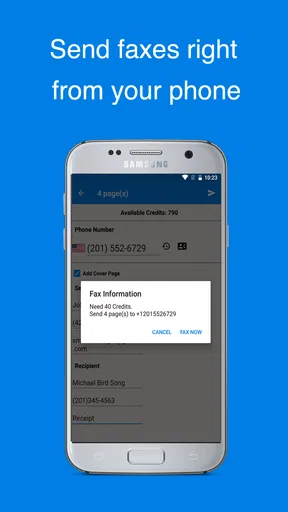
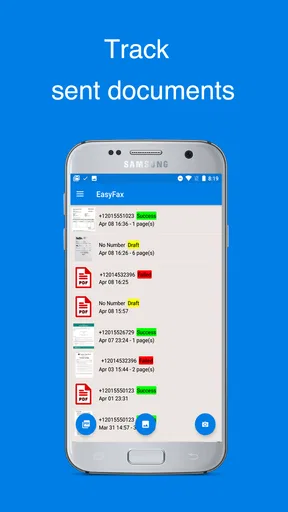
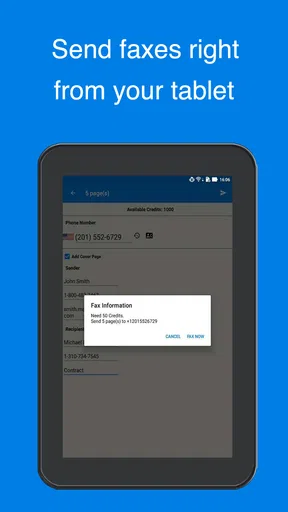
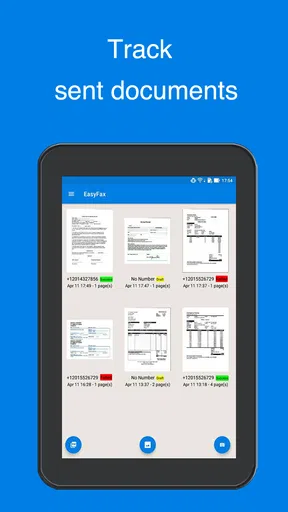
Sending faxes is a breeze. Simply choose the document, enter the recipient’s fax number, and hit send. You can send faxes to over 100 countries, which is perfect if you’re dealing with international clients or businesses. Plus, you get a confirmation once your fax is delivered. It’s reassuring to know your document has safely reached its destination.
Making the handoff less stressful
The phone-to-fax workflow is convenient, but it still has a handoff point: the moment the document moves from your screen to someone else’s fax system. I’d treat that moment with the same care as sending an important email attachment. Match the number against the recipient’s instructions, make sure the pages are in the intended order, and avoid including extra images that could confuse the person receiving them.
For a multi-page packet, I’d review every page before pressing send rather than assume the first page represents the whole file. Check that signatures are visible, pages are upright, and any handwritten notes can be read at normal size. If a form has a cover sheet or instructions from the recipient, follow those rather than guessing what they expect. These checks are especially worthwhile for time-sensitive paperwork, where a second transmission can mean repeating the whole process.
Another practical habit is to prepare the document before starting the send flow. If the source is a paper receipt or form, lay it flat and capture it in good light. If it is already on the phone, locate the intended file first and make sure it is the final version. That reduces the chance of switching apps in a hurry and choosing an outdated draft. The scanning tools help with presentation, but they cannot correct missing information or turn a blurry original into a reliably readable one.
Subscription Plans
Okay, let’s talk about money. After the free trial, you’ll need to choose a subscription plan. The plans are pretty flexible, with options to pay weekly, monthly, or annually. If you’re not planning to use it frequently, the weekly option might be your best bet. But for regular users, the annual plan offers the best value.
One thing to note is that you’re purchasing credits, and each fax requires a certain number of credits. So, keep an eye on your balance to avoid running out at a crucial moment.
The app is free to install, but that should not be confused with unlimited faxing at no cost. In-app purchases range from $2.49 to $49.99 per item, so I’d look at the current purchase choices in the app before committing to a plan or relying on it for recurring work. The exact value depends on how often you send and how many pages your documents contain. For someone who faxes once in a while, paying for a physical machine or a long-running service may be unnecessary; for frequent use, compare the credit and subscription approach with the alternatives you already have.
How it compares with the usual alternatives
Compared with a traditional fax machine, a mobile app avoids needing access to the machine itself and makes a quick send possible when the paperwork is already on your phone. The trade-off is that you must manage the image quality, recipient number, and available credits yourself. A machine may be a better fit for an office that sends and receives faxes all day, particularly when staff need a shared, established process.
Compared with email, Easy Fax is useful precisely when the destination requires a fax number. If the recipient accepts a PDF by email, that route is often simpler and easier to review before sending. For occasional tasks, I’d choose the method the recipient actually accepts rather than fax everything by default. This app earns its place as a fallback for real fax requirements, not as a replacement for every way of sharing documents.
Its business focus also makes the audience fairly clear. Freelancers, people dealing with paperwork from home, and travelers who sometimes need to send a document can benefit from having the option ready. Someone who never encounters fax-only offices, or someone whose work requires a dependable high-volume system with a shared team workflow, may be better served by email tools or a dedicated business solution.
What I Liked and What I Didn’t
Overall, my experience with Easy Fax was pretty positive. I loved the convenience of sending faxes without having to leave my house. The scanning and editing tools are top-notch, making it easy to ensure your documents look professional.
However, it’s not all sunshine and rainbows. The biggest downside for me was the occasional hiccup with document uploads. Sometimes it took a bit longer than expected, but nothing too frustrating. Also, while the app is generally user-friendly, people who aren’t tech-savvy might need a moment to get the hang of it.
Where the workflow can break
The weak point I’d plan around is the possibility of a delay while a document uploads. If I had a deadline, I wouldn’t leave the scan and send until the final minute; I’d prepare the pages earlier and allow time to check that the transfer completes. A slow or interrupted upload is frustrating because the rest of the process may feel ready while the file is still not through. For an urgent submission, having the original file accessible and knowing the recipient’s accepted alternatives can prevent a last-minute scramble.
Image preparation is another source of friction. A receipt folded into a wallet, a glossy page, or a document photographed under a strong overhead light may need another attempt. Brightness and contrast controls are helpful for refining a usable capture, but aggressive edits can erase faint marks or make fine print harder to read. I’d compare the adjusted image with the original and prioritize legibility over a polished look.
There is also a difference between sending successfully and completing the recipient’s process. A delivery confirmation tells me the fax reached its destination, but the recipient may still need time to review it or may ask for a clearer copy. For a form with sensitive consequences, I’d follow up through the organization’s normal channel if receipt matters, rather than assume the confirmation means the paperwork has been accepted or processed.
Who should keep it on their phone
The app has a 4.4 average from around 21,000 ratings, and it has passed over one million installs. Those figures suggest it has found a sizeable audience, but the more useful question is whether its occasional-use model matches your own needs. It is free to download, rated for Everyone, and its current version is 2.4.8; it requires Android 7.0 or later. The practical appeal is having a way to handle a fax-only request without making a separate trip.
I’d keep it in mind if I regularly encounter forms that need to go to a fax number but don’t send enough to justify a machine. I’d be more cautious if my documents are extremely sensitive, if I need a guaranteed rapid turnaround, or if my employer requires a particular approved channel. In those cases, I’d check the organization’s rules and use the designated service rather than assume a general-purpose phone app is suitable.
For a first send, I’d choose a non-urgent document, inspect the scan at full size, and review the purchase options before using credits. That gives you a chance to understand the workflow without discovering a blurry page or an unexpected cost at the worst moment. If you already have a clear digital document, use it instead of photographing a screen or printing and rescanning it; every extra conversion is another chance to reduce clarity.
Final Thoughts
In a world where faxing might seem a bit outdated, Easy Fax - Send Fax from Phone does a fantastic job of making it relevant again. It’s practical, efficient, and surprisingly simple to use. If you find yourself in need of sending faxes regularly, this app could definitely be worth your while.
So, if you’ve got a pile of documents waiting to be faxed, give Easy Fax a shot. It might just make your life a whole lot easier. And hey, who doesn’t love ticking off chores with just a few taps on their phone?
Verdict
Strengths of Easy Fax - Send Fax from Phone
- Simple interface for quick faxing.
- Supports multiple file formats.
- Offers cloud storage integration.
- No fax machine needed.
- Affordable pricing plans.
Limitations of Easy Fax - Send Fax from Phone
- Limited free faxes per month.
- Requires internet connection.
- Some features behind paywall.
- Occasional delivery delays.
- No support for international numbers.
Similar Picks in This Category
View All
LinkedIn: Community & Network
LinkedIn3.8

Zoom Workplace
zoom.com4.1

Microsoft Teams
Microsoft Corporation4.6

Meta Business Suite
Meta Platforms, Inc.4.6

Webex Meetings
Cisco Systems, Inc.4.5

TeamViewer Remote Control
TeamViewer4.4
Frequently Asked Questions
How does Easy Fax work on a smartphone?
Easy Fax allows users to send and receive faxes directly from their smartphones without the need for a traditional fax machine. By using your phone's camera, you can scan documents and send them as faxes to any fax number. The app converts your document into a format suitable for fax transmission.
Is Easy Fax secure for sending sensitive documents?
Yes, Easy Fax uses secure transmission protocols to ensure your documents are sent safely. It is essential to check the app's privacy policy and security features to understand how your data is protected. Users should also ensure they have a secure internet connection when sending sensitive documents.
What file formats does Easy Fax support?
Easy Fax supports a variety of file formats including PDF, DOC, and JPEG. This flexibility allows users to send faxes using documents created in different programs or scanned using their phone's camera. Always check the app's latest update for any changes in supported formats.
Are there any costs associated with using Easy Fax?
While downloading Easy Fax might be free, sending faxes typically incurs a fee. Users can purchase credits within the app to pay for fax transmissions. It's important to review the pricing structure to understand how much each fax costs and explore any available subscription options.
Can I receive faxes using Easy Fax as well?
Yes, Easy Fax allows users to receive faxes. However, this feature might require setting up a dedicated fax number, which could involve additional costs. Check the app's features to see if receiving faxes is included in your version or if it requires an upgrade.
